
[2026] Practice with these 220-1202 dumps Certification Sample Questions
Get Instant Access of 100% REAL 220-1202 DUMP Pass Your Exam Easily
NEW QUESTION # 106
SIMULATION
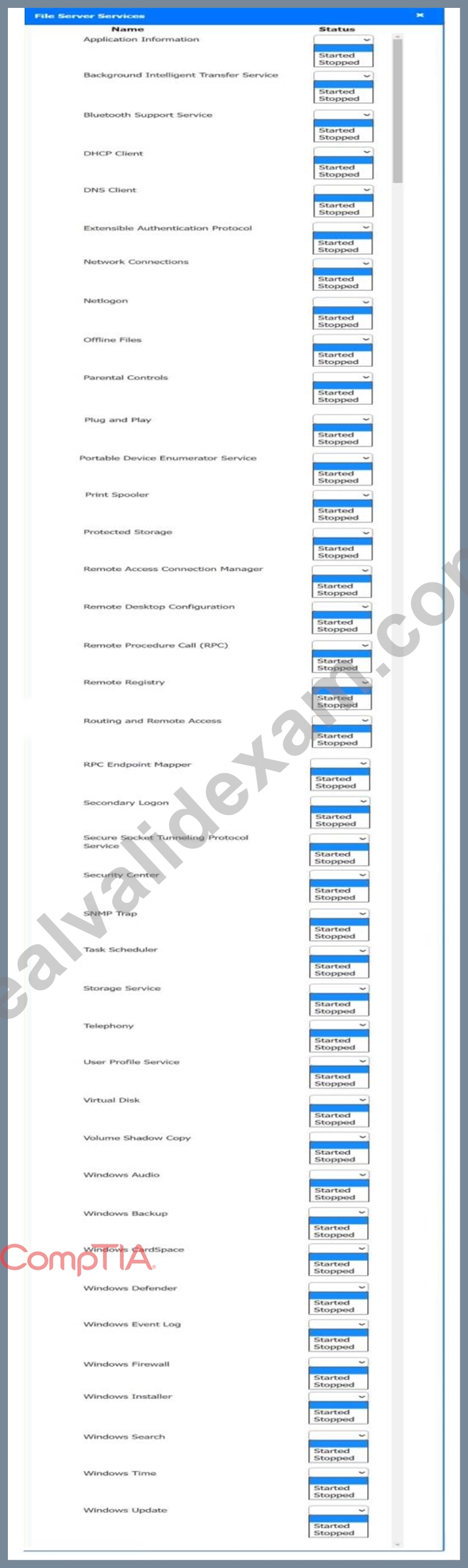
Multiple users are reporting audio issues as well as performance issues after downloading unauthorized software. You have been dispatched to identify and resolve any issues on the network using best practice procedures.
INSTRUCTIONS
Quarantine and configure the appropriate device(s) so that the users' audio issues are resolved using best practice procedures.
Multiple devices may be selected for quarantine.
Click on a host or server to configure services.
If at any time you would like to bring back the initial state of the simulation, please click the Reset All button.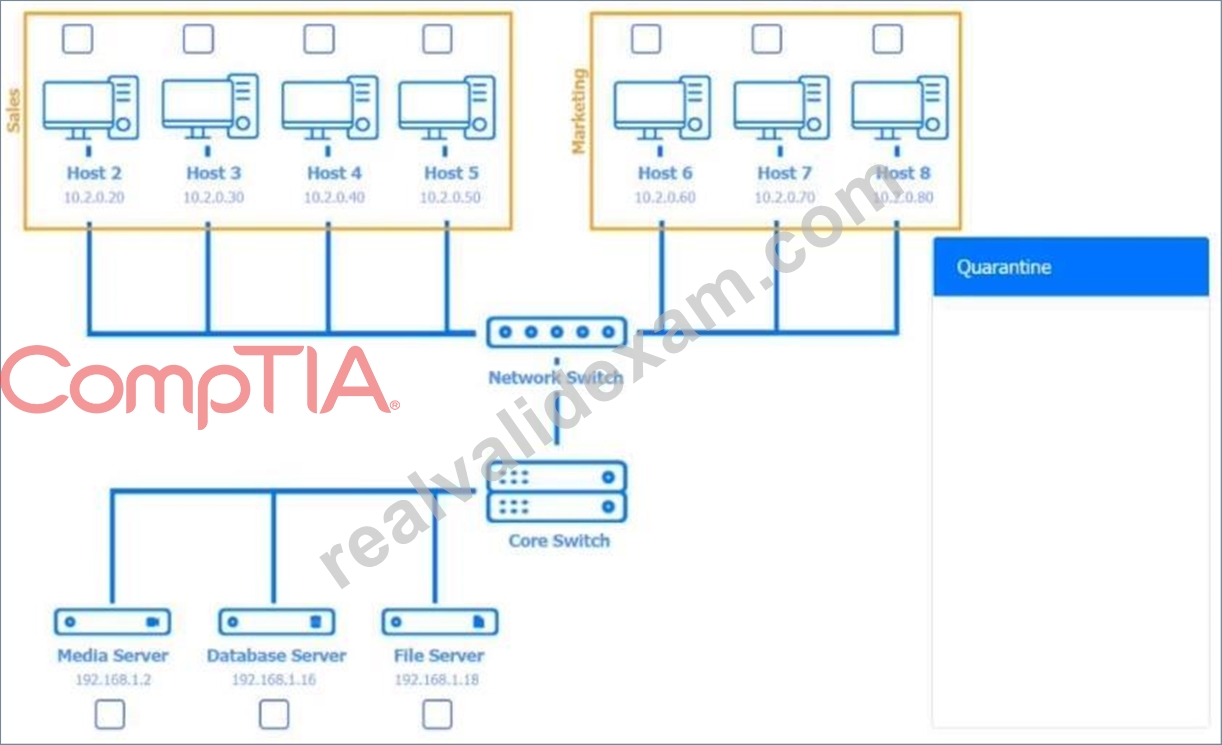
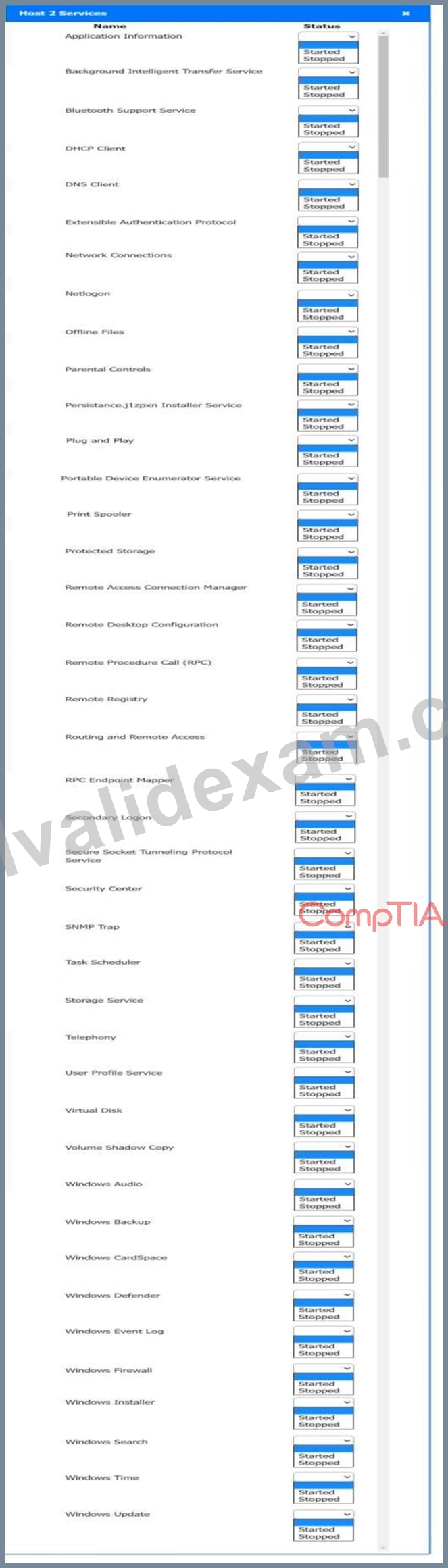
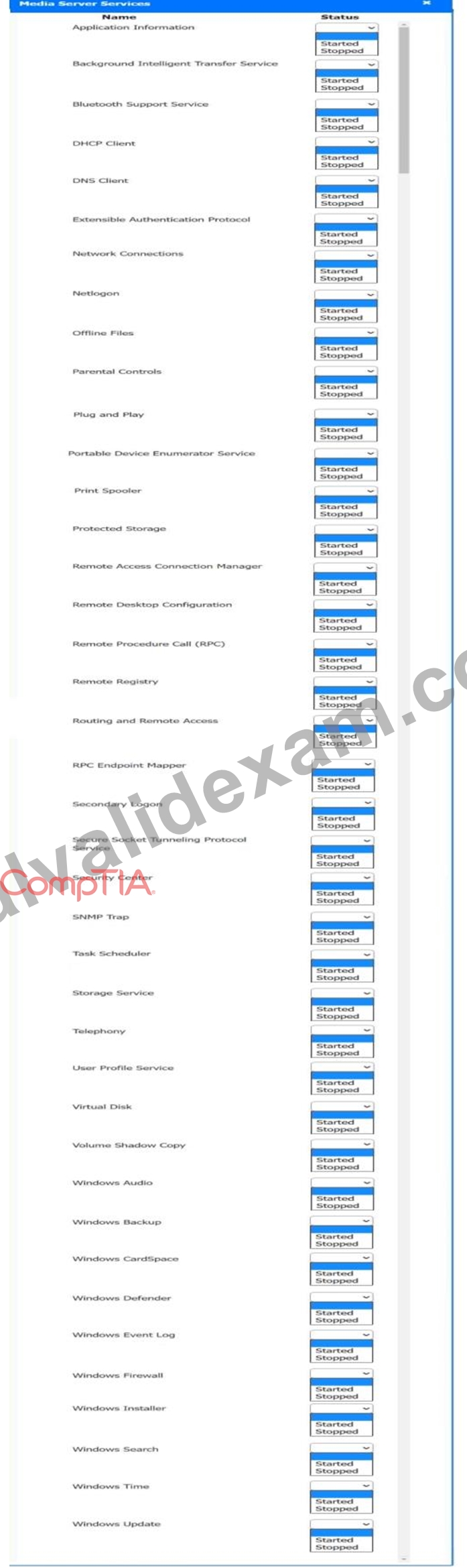
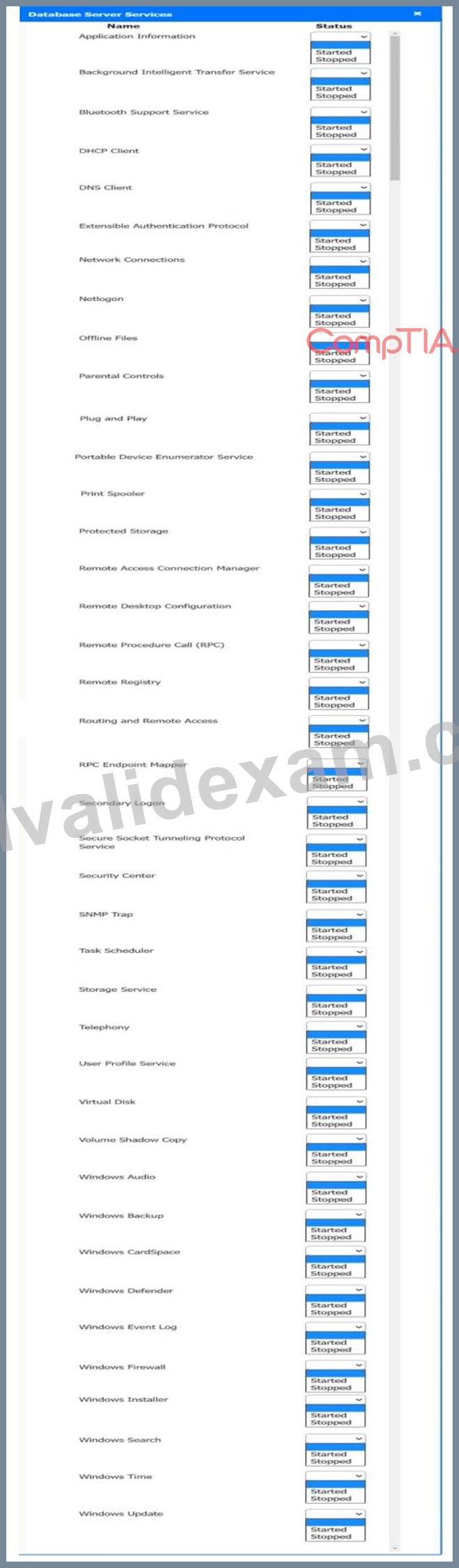
Answer:
Explanation: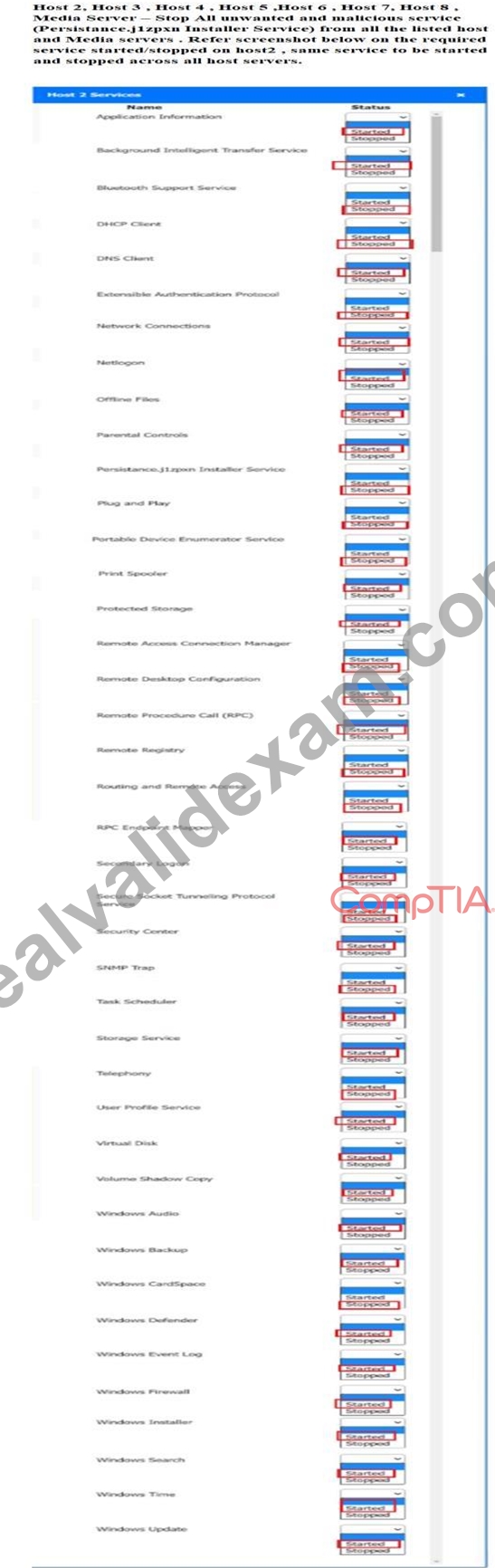
NEW QUESTION # 107
A user needs to test several software replacement possibilities. Part of the process involves installing the different software options on a corporate-imaged sandboxed PC. Which of the following is the best option to allow the user to install the required software?
- A. Give the user the local, high-privileged account password.
- B. Let the user use credentials from another user who has rights.
- C. Add the user to the local Administrators group.
- D. Make the user a member of Domain Admins.
Answer: C
Explanation:
Adding the user to the local Administrators group on the sandboxed PC grants the necessary permissions to install and test software without giving excessive domain-wide privileges. This follows the principle of least privilege by limiting elevated access to only the specific machine required for testing.
NEW QUESTION # 108
A smartphone user unsuccessfully attempts to open an email attachment that includes an unexpected overdue invoice. After that attempt, the user notices performance issues while using the mobile browser and other applications. The user restarts the smartphone, but the issue persists. Which of the following actions would most likely resolve the issue?
- A. Deleting the email containing the attachment
- B. Uninstalling and reinstalling the mobile browser
- C. Wiping the device and resetting it to factory defaults
- D. Forcing the smartphone to shut down and restarting it
Answer: C
Explanation:
The scenario strongly suggests the device has been compromised by malware delivered through a social- engineering message (an "unexpected overdue invoice" attachment). After the attempt, the phone shows system-wide performance issues affecting the browser and other apps, and a restart does not fix it-this matches common mobile malware symptoms such as sluggish response time and abnormal behavior that persists across reboots. When symptoms persist beyond a soft reset, the most reliable remediation is to return the device to a known-good state by performing a factory reset (wipe). Quentin Docter explains that a factory reset is much more effective and will remove malware along with applications, and that when a security symptom indicates malware, the device should be factory reset and then protected with antimalware before reinstalling apps.The All-in-One guide similarly teaches an escalation path: stop/uninstall suspect apps, and if these steps don't resolve the behavior, use a factory reset to cleanse the device.#turn27file4 L9-L14# Mike Meyers' Lab Manual also lists factory resets among the key tools for resolving persistent mobile app security issues.
References: Quentin Docter - CompTIA A+ Complete Study Guide (mobile malware symptoms; factory reset removes malware)#turn27file2 L9-L15#; Travis Everett & Andrew Hutz - CompTIA A+ All-in-One Exam Guide (factory reset to cleanse device when symptoms persist)#turn27file4 L9-L14#; Mark Soper - Mike Meyers' A+ Lab Manual (app security troubleshooting tools include factory resets)
NEW QUESTION # 109
A user recently returned from an international trip and finds that their smartphone can connect to the Internet and send emails while at home on Wi-Fi, but cannot access any data services once they leave the house. Which of the following should the technician do FIRST to resolve this issue?
- A. Increase data limits.
- B. Disconnect the VPN.
- C. Enable cellular data.
- D. Reinstall the SIM card.
Answer: C
Explanation:
If the phone works on Wi-Fi but not off Wi-Fi, the most likely issue is that cellular data is disabled (or restricted). This aligns directly with the CompTIA A+ objective language for mobile troubleshooting, which explicitly includes "wireless/cellular data network (enable/disable)." After travel, users often enable airplane mode or disable cellular data to avoid roaming charges, and sometimes forget to re-enable it.
Quentin Docter's mobile connectivity discussion repeatedly distinguishes Wi-Fi access from cellular connectivity and treats cellular settings as a primary area to verify when Internet access is not available away from Wi-Fi. While data caps/limits could throttle service, they usually don't make all non-Wi-Fi browsing and email impossible immediately. VPN issues might block some access, but the simplest "most likely" resolution based on the symptom is re-enabling cellular data. Reinstalling the SIM is possible, but again not the first, most likely fix given the scenario framing. Therefore, Enable cellular data (A) is correct.
NEW QUESTION # 110
A user is unable to see transaction details on a website, and nothing happens when the user clicks the details button. Which of the following should the user do to fix this issue?
- A. Verify valid certificates.
- B. Configure private browsing.
- C. Disable the pop-up blocker.
- D. Clear the browser cache.
Answer: C
Explanation:
Pop-up blockers can sometimes prevent essential pop-up windows required by websites to display transaction details.
Clear the browser cache: Helps with loading issues but not specific to pop-ups.
Disable the pop-up blocker: The correct solution, as it allows the blocked pop-up to be displayed.
Configure private browsing: Prevents storing browsing data but does not affect pop-ups.
Verify valid certificates: Ensures secure connections but does not resolve pop-up issues.
NEW QUESTION # 111
A technician needs to configure settings for password complexity and failed log-in attempts before a user is locked out. These settings cannot be changed by standard users. Which of the following MMC snap-ins should the technician use?
- A. gpsdit
- B. perfmon
- C. taskschd
- D. lusrmgr
Answer: A
Explanation:
The gpedit (Group Policy Editor) MMC snap-in is used to configure password complexity and account lockout policies that standard users cannot change.
NEW QUESTION # 112
After a user installs a mobile application from an advertisement, the phone's battery dies a few hours later, and it is hot to the touch, even when not in use. Which of the following should a technician do first?
- A. Ensure appropriate MDM policies are applied
- B. Run a mobile malware scan on the phone
- C. Check for unauthorized device administrators
- D. Contact the software developer
Answer: B
Explanation:
Comprehensive and Detailed Explanation From Exact Extract:
These symptoms strongly suggest malware activity-likely from the newly installed app. The first action should be torun a malware scanto detect and isolate malicious software.
FromQuentin Docter - CompTIA A+ Study Guide:
"Signs of malware infection include rapid battery drain and overheating. The first step should be a malware scan using trusted mobile antivirus apps."
NEW QUESTION # 113
A technician is troubleshooting an issue in which a service runs momentarily and stops at certain points in the process. The technician needs to determine the root cause of this issue. Which of the following tools should the technician use?
- A. Internet Options
- B. Task Manager
- C. Event Viewer
- D. Process Explorer
Answer: C
Explanation:
Event Viewer logs system, application, and service events, including errors and warnings when a service stops unexpectedly. Reviewing these logs provides detailed error codes and messages that help identify the root cause of the service interruptions.
NEW QUESTION # 114
An administrator must write a script that will output the OS name to a file. Which of the following commands is the best way to accomplish this task?
- A. whoami
- B. winver
- C. netstat
- D. hostname
Answer: B
Explanation:
The winver command displays the Windows operating system name and version information.
This makes it the appropriate command to use in a script when the requirement is to output the OS name to a file.
NEW QUESTION # 115
A user calls the help desk to report an issue with their smartphone. After the user returns from a business trip, the user is no longer able to access email or visit websites without a Wi-Fi connection on the smartphone. Which of the following would the user do to most likely resolve the issue?
- A. Increase data limits.
- B. Disconnect the VPN.
- C. Enable cellular data.
- D. Reinstall the SIM card
Answer: C
Explanation:
If the smartphone works only on Wi-Fi and not on mobile networks, the most likely cause is that cellular data is disabled. Enabling cellular data restores access to email and websites while away from Wi-Fi.
NEW QUESTION # 116
A company wants to prevent unauthorized physical access to its mobile devices. Which of the following should the company do? (Select two).
- A. Turn on location services
- B. Install an antivirus application
- C. Disable built-in hotspots
- D. Configure VPN software
- E. Enable screen timeout
- F. Use PIN authentication
Answer: E,F
Explanation:
The correct answers are D. Use PIN authentication and F. Enable screen timeout, because both controls directly protect a mobile device from unauthorized physical access. Physical access controls are designed to prevent someone from using a device if it is lost, stolen, or left unattended.
According to the Quentin Docter - CompTIA A+ Complete Study Guide, mobile device security begins with lock-screen controls, such as PINs, passwords, biometrics, and automatic locking mechanisms. A PIN authentication requirement ensures that even if an attacker physically possesses the device, they cannot access its contents without the correct credentials.
The guide further explains that screen timeout (automatic locking after inactivity) is a critical security feature. Without it, a device left unattended-even briefly-could be accessed by unauthorized individuals.
Enabling a short timeout greatly reduces this risk.
The Travis Everett & Andrew Hutz - All-in-One Exam Guide reinforces that VPNs and antivirus software protect data in transit and against malware, not physical access. Likewise, disabling hotspots and enabling location services are management or tracking features, not access prevention mechanisms.
The Mike Meyers / Mark Soper Lab Manual emphasizes that physical security controls focus on preventing interaction with the device itself, making PIN authentication and automatic screen locking the most effective measures.
Therefore, D and F are the correct answers.
NEW QUESTION # 117
Multiple users clicked a phishing link from a compromised email account. The security team isolates and removes the threat. Then, the management team provides security awareness training to the company. What step is this?
- A. Update the antivirus software.
- B. Compile lessons learned.
- C. Provide user education.
- D. Perform additional scans.
Answer: C
Explanation:
This is part of theuser educationstep after a security incident to prevent future occurrences.
FromQuentin Docter - Complete Study Guide:
"User education and awareness is a crucial part of preventing phishing attacks. After an incident, it is vital to train users on recognizing suspicious messages." .
NEW QUESTION # 118
After a user installs a mobile application from an advertisement, the phone's battery dies a few hours later and becomes hot to touch, even when not in use. Which of the following should a technician do first?
- A. Ensure appropriate MDM policies are applied
- B. Run a mobile malware scan on the phone
- C. Check for unauthorized device administrators
- D. Contact the software developer
Answer: B
Explanation:
Comprehensive and Detailed Explanation From Exact Extract:
These symptoms strongly indicatemalware infectionor a malicious app running in the background. The first action should be torun a malware scanto identify and remove malicious components.
FromQuentin Docter - CompTIA A+ Complete Study Guide:
"If a mobile device is overheating and the battery drains rapidly after installing an app, this could point to malware. Begin by scanning the device with a mobile anti-malware application."
NEW QUESTION # 119
An organization wants to deploy a customizable operating system. Which of the following should the organization choose?
- A. Linux
- B. Chrome OS
- C. iOS
- D. macOS
- E. Windows 10
Answer: A
NEW QUESTION # 120
A user's new smartphone is not staying charged throughout the day. The smartphone charges fully every night. Which of the following should a technician review first to troubleshoot the issue?
- A. Charger wattage
- B. Background applications
- C. End of software support
- D. Storage usage
Answer: B
Explanation:
Comprehensive and Detailed Explanation From Exact Extract:
Background applications can significantly drain a smartphone's battery, even when the device is idle. A technician should first review which apps are running in the background and consuming power through the battery usage section of the OS. Disabling or restricting power-hungry apps often resolves poor battery life.
A: Storage usage doesn't significantly affect battery life.
B: End of software support is unrelated to battery performance unless it's causing inefficient processes, which would still be secondary.
C: Charger wattage affects charging speed, not battery life after charging.
Reference:
CompTIA A+ 220-1102 Objective 3.3: Troubleshoot common mobile OS and application issues.
Study Guide Section: Diagnosing battery and app performance issues on mobile devices
NEW QUESTION # 121
Company employees do not have assigned workspaces and regularly work at different computers and physical locations. Which of the following should the company implement to maintain data security and minimize the amount of user data that needs to be transferred?
- A. Centralized certificate storage
- B. Roaming profiles
- C. Cloud email
- D. Portable drives
Answer: B
Explanation:
The correct answer is D. Roaming profiles, because roaming profiles allow users to log in to any domain- joined workstation and automatically access their personal settings, documents, and configuration without storing data locally on each machine. This is ideal for environments with hot-desking or shared workstations.
According to the Quentin Docter - CompTIA A+ Complete Study Guide, roaming profiles store user data centrally on a server rather than on individual computers. When a user logs in, their profile is loaded; when they log out, changes are saved back to the server. This minimizes data duplication and reduces the risk of data being left behind on shared systems.
The Travis Everett & Andrew Hutz - All-in-One Exam Guide emphasizes that roaming profiles improve security by preventing sensitive user data from being permanently stored on multiple endpoints. This also simplifies backup and recovery, since user data resides in a centralized location.
The Mike Meyers / Mark Soper Lab Manual clarifies that portable drives introduce data loss risks, cloud email only addresses messaging data, and certificate storage does not manage user profiles or documents.
Because the goal is to maintain data security while allowing mobility and minimizing data transfer, roaming profiles are the most appropriate solution, making D the correct answer.
NEW QUESTION # 122
A network technician notices that most of the company's network switches are now end-of-life and need to be upgraded. What should the technician do first?
- A. Schedule the change
- B. Document the change
- C. Approve the change
- D. Implement the change
Answer: B
NEW QUESTION # 123
After several workstations received OS updates, users report that their network speeds have dropped. A technician verifies that the network speeds on other workstations are fine. Which of the following would most likely solve the issue on the updated workstations?
- A. Switching the workstations to IPv6
- B. Rolling back to the previous driver
- C. Restarting the router
- D. Replacing the network cards
Answer: B
Explanation:
The issue began after OS updates and affects only specific workstations, indicating a likely driver- related problem. Rolling back to the previous network driver can restore proper performance if the updated driver introduced compatibility or performance issues.
NEW QUESTION # 124
......
Free Exam Files Downloaded Instantly: https://actualtests.realvalidexam.com/220-1202-real-exam-dumps.html
